Children’s App Review!

Kids ABC Phonics Lite App Review

10340525-1369791402158There are so many applications out there catered to children. The application, “Kids ABC Phonics Lite” in particular, is directed towards children two to three years old. It is intended to teach children general phonics, identification of letters in the alphabet, the sounds and objects associated with them, matching shapes (puzzle pieces), and improve a child’s dexterity and hand-eye coordination through the “Pop Letter Bubble” game available through the app. Right off the bat the app identifies itself as an educational too for children through its title and the home page being a chalkboard. There are four different sections within the app. A “Learn Letter Sounds” section is available, where children are introduced to a cube which holds the letter on one face and three objects starting with that letter on each face of the cube.  The child is able to rotate the cube to each face containing an object or letter, in which the application would verbally identify the letter and the sound associated with it, as well as name the object. The “Build Letter Blocks” section of the application allows children to create the blocks they were once using in the “Learn Letter Sounds” section and allows for children to group “like” objects together. Within the “Pop Letter Bubbles” section, children are given the sound of a letter and then asked to pop the bubble they see which is carrying the letter that makes the corresponding sound. And finally, “Make Words” is a section which resembles its title. It is an area of the application, where children are presented with three letters which are on puzzle pieces and are asked to link them together in the right spot, so together they can spell a word. Once the word is revealed an image associated with the three letter word appears.

I chose to review this application because I wanted to find something that would aid my sister in her development. Right now she is at a point where she can sing the alphabet and can make the connection between the appearance of the letter and its sound, but not for all twenty-six letters of the alphabet.  So for that reason, I feel that this app is an excellent tool that she is able to use on her own. It is very simple to maneuver  through using the back and next arrows. Once putting her through to the “Learn Letter Sounds” section, I didn’t even need to explain or model what to do. Before I knew it, Sabrina was flipping the cube, repeating what the application was saying, and making connections between sounds and words, and letters and objects.

images

There were many great features within this application, which would benefit the ECE profession. For instance, it is very much child-directed and provides a number of learning outcomes, it gives children options and uses hypermedia (such as: images, audio, animations, and text) in all of its pages as it has images of objects, letters, different words, and animations in rotating cubes and within the bubble game, as well as audio either for pronunciation of letters, words, and congratulatory language. There is also hypertext being used to create a more non-linear design in connecting all of the sections and hypermedia within the app. Having connections formed in expanded directions allow for the children to maneuver through the application a lot more efficiently. This software allows for children to make the connections between icons and tasks and hold those connections within their working memory, which gives them a boost of confidence. This is a great tool within the ECE field as getting a child to build active parts of their brain, make connections, and build their memory aids in so many other areas of their development. Gaining all of these skills will help in other activities and tasks that educators may have for children down the road. For instance, building good memory and picture word associations can assist with tidy-up time after free play and knowing where to put everything. The bubble pop game congratulates the child in a positive manner after popping bubbles containing letters related to the sound of a requested letter. The congratulatory word usually begins with the letter that was correctly popped, such as “That was exceptional” (Intellijoy, 2013), after popping the bubble holding the letter “e”.  Kids ABC Phonics Lite, is excellent in that is provides tasks appropriate for growing toddlers, and it is diverse in the activities it offers. Looking at the software apart from the educational components the application has high-quality technical components as it is completely user friendly, the graphics are clear, all of the sections are neatly organized, a child is able to easily navigate through the application, and it is visually appealing. The “Learn Letter Sounds” acts as a prerequisite for the “Build Letter Blocks” section of the app, as it requires knowledge of the letters of the alphabet and what objects can be associated with them. In this case, we are moving from being given everything grouped to having to group it ourselves. This kind of resembles a “practise and review” (Goyne, 2000).

There are really no downfalls to this application, but there can be room for improvement. In terms of social interaction, there can be an educator or adult figure there as a reference for the child and to show them encouragement when fulfilling a task. However, there is no social interaction with any one through the application. It would be an improvement if the application had a section which resembles a face-to-face social network, where children can begin to play games and do activities with other children and parents. The software is fairly interactive on its own having  a bubble pop game, forming words activity and making letter blocks activity, however, it could use slight improvements. As far as animations go, each of the objects could be moving and interactive instead of just an image. When clicking on an object or forming a word the object could have actions associated with it and describe the object out loud. In terms of hosting a learning experience in an authentic and relevant context, I feel as though there could be more praise by saying “Hooray!” or having a song play instead of having an automated voice say “That was great” (Intellijoy, 2013) or nothing at all (Goyne, 2000).

11201105-1375278294156Some tips and recommendations that I would give an ECE who wishes to use, Kids ABC Phonics Lite, is to simply hand the tablet to the child you are working with and allow them to explore the app freely. If you notice the child is uninterested or is hesitating in what to do, then use guiding questions or better yet, model it for them. You will be amazed at how fast they go from poking at  the screen to dragging, clicking, scrolling, and jumping from page to page. Overall, this is a great app that is very positive, easy to use, and easy to access as it is offered as a free application for android devices.


References:

Goyne, J.S., McDonough, S.K., Padgett, D.D. (2000). Practical guidelines for evaluating educational

               software. The Clearing House. 73(6), 345.

Intellijoy. (2013). Kids ABC Phonics Lite. Google play. Retrieved from,

https://play.google.com/store/apps/details?id=zok.android.phonics

Peekaboo Website Review

Assessing Child Care Centres Online Presence

The Peekaboo Child Care Centre website welcomes you with a colourful blue, yellow, and red theme filled with icons of cartoons of children from varying backgrounds. This alerts their visitors that they are in fact a centre that not only accepts individuals of all backgrounds, but values culture and diversity. Right on the home page the centre’s logo it placed in the header, a notification slideshow of the new program being offered at Peekaboo as well as how to connect with them on different sources of social media, a place where you can take a virtual tour of a standard one of their centres, an area you can book a tour to see a centre in person, a link to a new app they have in connection to their centre (Pipeline), and a link to an about page. Peekaboo gives all of the appropriate introductory links that prominently displayed on their first page. Peekaboo’s mission as a centre is to “provide a comfortable, safe and nurturing environment where children will be stimulated to develop social, physical, emotional and intellectual skills” (Arkell, 1, 2011). The main contact is based on the location that the user is interested in contacting. There is a place which allows for users to find which location is closest to them, given that they provide their home or work address, postal code, or city. The target audience of the website is anyone and everyone who has children. It is clear that the centre is directing their website towards a large population of diverse individuals as the children in their logo as well as images on their web pages indicate those of varying cultural backgrounds.

peekaboo logo

Professionalism & Usability….       

By looking at the structure, navigating features, categories, and overall physical appearance I think it is safe to say that Peekaboo has done an exceptional job at maintaining a level of professionalism, but at the same time keep it fun and playful. The usability and navigation of the Peekaboo website was quite simple and straightforward. The website is not overpowered with hyperlinks that link off to numbers of pages. They have done a great job in keeping the number of pages each page branches off to fairly minimal, which is nice. As far as contacting a head of the organization, I would imagine that to be a challenge as the site primarily brings its users to a page which has a pool of all of the different locations that users can search through or have found for them. I do wish that there was an about option as part of the header instead of as a link on the home page because the header is the first place I checked to find their about page and is generally the first place anyone looks for an about page.

Multi-media & Best Qualities…

Multi-media is used through testimonials by parents captured on video, virtual tours of a standard centre, and a search bar which looks for the closest location to the address given by the user. The best qualities of this website is its appearance as it lets you know that it is child-oriented as it is filled with bright playful colours, the organization and display of all the different locations, and how simple it is to navigate.

peekaboo website 2

Recommendations & Making Connections to the Field of ECE….

Some recommendations for the next iteration of this site would be to have a head contact number available for visitors to go to and have a “contact us” section within the header, include an “about” link as part of the header for easy access, and possible add a couple more pages. The hyperlinks at the moment may be a little too simple. I would add a couple more pages linking off each location which would be designated for the director of that particular centre to manage. They could include event information, a page for communication between staff and parents, or even general information about different programming within the centre. There isn’t much multi-media being incorporated into the site, so I would recommend posting a how to or informative video on the new Pipeline app, or simple icons that one can click to link them so social networks that the organization has taken part of. Overall, I feel Peekaboo has done a fabulous job with maintaining a website that is physically attractive, informative, and well organized.

Being able to go to a website and assess what it offers is an essential skill for any ECE as it a gives them common knowledge of what to use as an acceptable resources in the extra studies they do outside of their job or even research they do for their job within the centre within the centre (ex. searching for appropriate activities for children or ideas on how to set up a classroom). For the field of ECE it is an essential skill to know how to create a website if there for professional development and reflective purposes, as well as maintaining a professional image for the organization you are representing. By having a professional website that is easy to navigate, visually appealing, informative, and filled with different forms of multi-media it allows the public to gain a sense of who you are as an organization and boost your reputation and professional appeal to the public.

References:

Arkell, L. (2011). Why Peekaboo? Peekaboo child care centre. Retrieved from, http://www.peekabookid.com/node/59

Letters Won’t Bite

Endless Abc App Reaction!

My sister loves using technology. She enjoys playing music videos on my labtop, sneaking away my phone to take selfies and random video and pictures of the floor ceiling and everything inbetween, and most of all using a tablet. Having a tablet for her to use combines the experience of a labtop and camera into one. She still loves taking the randomest and most obsured images, watching music videos, but not with the innovative technology of  a touch screen tablet she really enjoys the simple functions of what it takes to operate it. She loves taking her chubby little finger and dragging it accross the screen in order to flip through pages, close screens, or scroll. She knows when to tap to screen in order to click a button, is able to associate icons with the function of each application, and is able to identify what each application does.

Now that Sabrina has grasped how to manover through things using a tablet, we decided to get one of her own. Unfortunately, a Lenovo tablet seemed to be slightly more complex in visability and accessability of installed applications. Although, manovering through the tabet is something that she is able to carry from touch-screen to touch-screen no matter what the device. Sabrina, however, had an easy solution to struggling with the Lenovo. She simply helped herself to the Blackberry tablet , sneak into a room by herself, and open all of the different applications loaded.

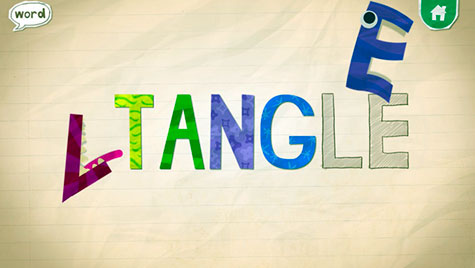
Yesterday I introdced “Endless Alphabet” to my sister in which she resisted and was fearful to try because of the humanistic features of the letters. This app is truely amazing and after walking my sister through it i’m sure she thought so as well. Because of the teeth which appeared on some of the letters, Sabrina, grew fear of the letters bitting her finger. In order to get her warmed up and comfortable with the app, I began moving the letters around with my finger and demonstrated the pairing of the outline of the pairing of similar letters. Once she saw me play on my own, her interst grew, but still was not willing to touch the letters. So I did hand-over-hand, where she grew even moe comfortable with the app, and before I knew it she was placing letters in the rightful place, spelling words, and repeating the sounds that each letter makes.

Witnessing the progress that I have seen with my sisters understanding of letters within just two and  a half ours was truely amazing. I gues that just goes to show how great of an impact technology can influence a childs development.

The First Day Back

Connecting to Connect

We can provide children with opportunities that are unimaginable with some help from our friend technology.


I recently subscribed to a blog called “Friendship Circle”, which is a blog created by a parent with a child who has special needs and is directed towards parents and educators who have children with special needs. I must say that it was very difficult choosing which of the articles to review, only because I could connect to all of them so well. Not because I am the parent or educator of a child with exceptionalities, but I am a sister of a child with a developmental delay. My sister’s name is Sabrina and we’re two years apart. I’m 21 and Sabrina is 20 years old. Sabrina was born with a developmental delay, where you would never be able to guess that she is a child with exceptionalities by first glance. But, as you observe, her walking is that of a waddle, her speech is slightly slurred and limited to four or five word sentences, however, her social skills is absolutely impeccable. You see, you don’t have to “speak words” in order to communicate. Sabrina communicates with slight use of words, but mainly her body language, her facial expressions, her tone, and her actions. Regardless of her stage of development, she is the most affectionate person I have ever encountered. She knows what she’s feeling, can identify her emotions, and shows it. As I am a sister, and many of the authors in the blog postings in Friendship Circle are parents or educators, we all have common ground. We all want what is best for that special child in our lives and do whatever we can to encourage their development into the best possible being they can be.

We can make uniqueness championed!

The “8 things a Teacher Should Know about your Child with Special Needs”, blog posting covers several of the things my family has encountered while sending Sabrina back to school after the long summer holidays. The first is, maintaining that consistent schedule. We all know how key it is to have that steady routine each and every day that we follow, which makes every day so much more manageable and just makes it flow better. For instance, while on summer vacation we all tend to slack off on the structure of our day and have a more relaxed feel where we maybe go to bed a bit later and wake up a bit later. I sure saw this trend with Sabrina because a week before school started she was still in that mode where she was really acting like such a teenager. She would go back to the same position if you moved her to try to break her out of her sleep, and then she would be such an old grump once she was finally awake. So, without having a managed routine that you follow every day, everything would be pure chaos. Another helpful tip brought up in the Family Circle blog posting, was to “ask the teacher about classroom routines and expectations”(Hill, 2013, 1). This is always a long process for my sister in particular, because we were told about log-ins, pick-up and drop offs, bus schedules, forms to be filled out for her seizure protocol form, a medication form, a transportation form, and several others. The third vital point brought up was “sharing the school routine with your child’s therapist”. This step of the journey going back to school didn’t have to be done this year for our family as Sabrina is over the age of eighteen. Giving your child’s teacher an overview of where your child is developmentally is also a critical topic to be discussed so that the team working with your child knows the extent of their language and speech, strengths and weaknesses, and can work together with you and the family in raising the best possible learning experience and environment for your child. Something that my sister struggled with her first day back was her eating habits. She was resistant when it came to eating her lunch and that was because she wasn’t use to her new teacher and someone starring at her when she was trying to have her meal. So in that sense, I would say to always check in with the educators, ask them how your child’s day was, if there were any problem, and provide suggestions or give reasoning as to why things like not eating their lunch, may be happening. Finally, it is best to lay everything out on the table with regards to how your child’s behaviour is. For instance, maybe your child is more on the aggressive side, it is always helpful if tips and tricks are told to those who are looking after your child for the day, so that their day may run a bit smoother. In our case, Sabrina, is known within the school and around the community for being super affectionate and a complete sweetheart (Hill, 2013).

An Improved way of living.

Overall, the “8 things a Teacher Should Know about your Child with Special Needs”, connects to scholarship on technology and learning as the article was all about connecting with families and educators and finding out how educators can provide a better experience for children of special needs. This includes finding ways that may support the child’s learning. For instance, something like telling the educator your child really enjoys listening to music, playing on a tablet or computer, watching movies, or even just lying in the snoezelen room where they are surrounded by different lights, calm music, a projected scenery and different scents and textures. Needs such as access to wheelchairs, ipads, automatic doors, ramps, and other assistive technologies are also essential things that should be discussed amongst staff within the center and families. By having that open communication and knowing what the child’s interests and needs are, ECE professionals are able to set-up an environment in a way that encourages the development of each child and if the center does not have the resources then motivate them in attaining all of the required equipment.

It is truly remarkable how much technology can make a difference in the lives of children with special needs.

Reference:

Hill, J. (2013). 8 Things a teacher should know about your child with special needs. Friendship Circle Blog. Retrieved from,

http://www.friendshipcircle.org/blog/2013/09/30/8-things-you-should-tell-your-childs-teacher/